Finger Placement Chart: The Complete Guide to Proper Typing Technique
If you want to type faster and more accurately, learning correct finger placement is not optional — it’s essential.
Many people try to improve their typing speed by practicing random paragraphs or taking repeated typing tests. But without proper finger positioning, progress becomes slow and inconsistent. The real secret behind fast typing is using all ten fingers correctly.
This guide will walk you through the complete finger placement chart, explain which finger presses which key, and help you build a strong foundation for touch typing.
Why Finger Placement Matters
Correct finger placement helps you:
- Build muscle memory
- Reduce typing mistakes
- Increase typing speed naturally
- Avoid unnecessary hand movement
- Prevent wrist and finger strain
When each finger has a specific responsibility, your hands move efficiently instead of randomly searching for keys. Touch typing works best when every finger knows its job.
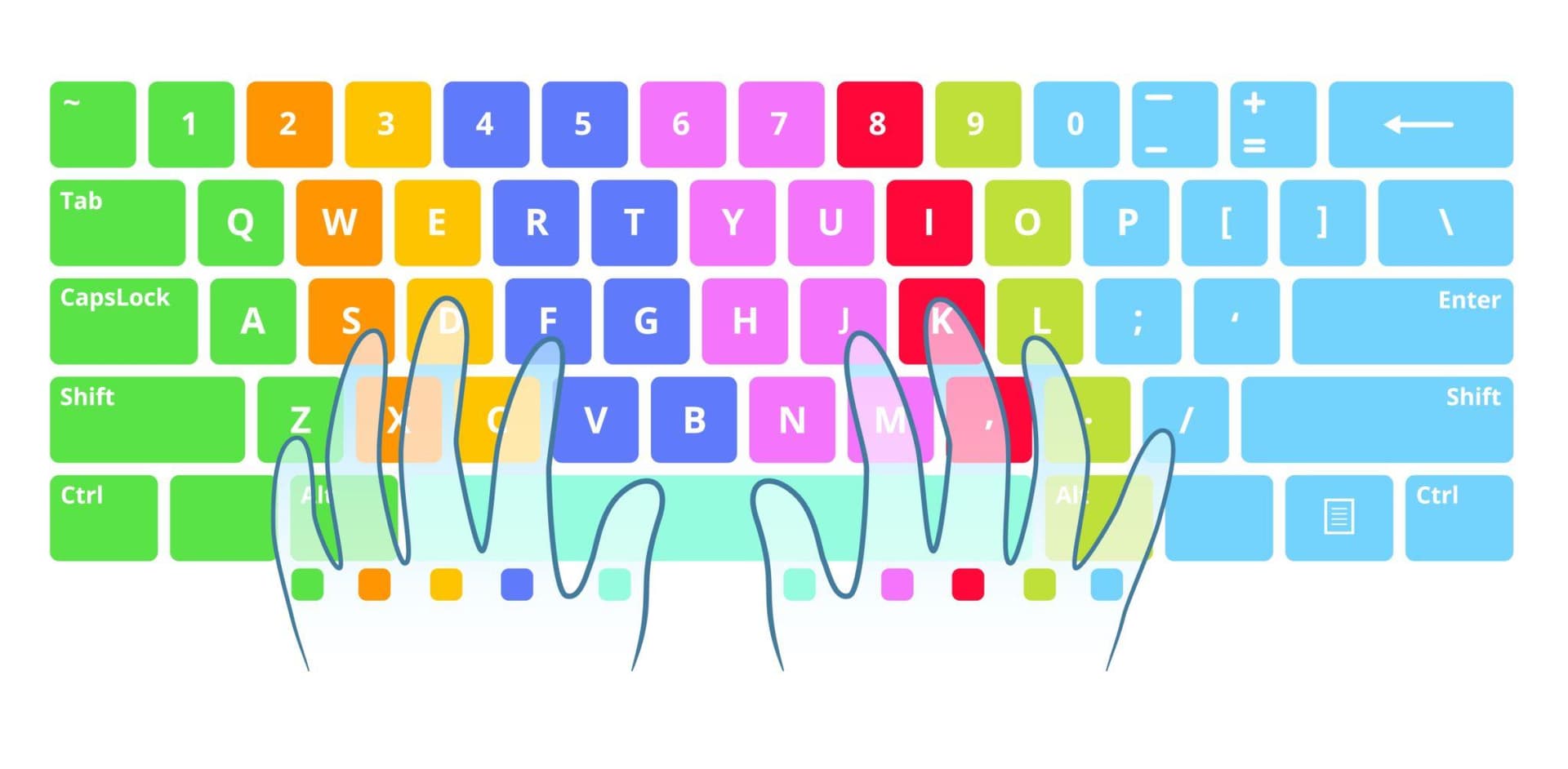
The Home Row: Your Starting Position
Before understanding the full chart, you must know the home row. Your fingers should always return to these keys after pressing any letter:
- Left Hand: A – S – D – F
- Right Hand: J – K – L – ;
Your thumbs rest on the spacebar.
The F and J keys have small raised bumps to help you position your index fingers without looking down.
Complete Finger Placement Chart
Below is the standard finger-to-key assignment used in professional touch typing.
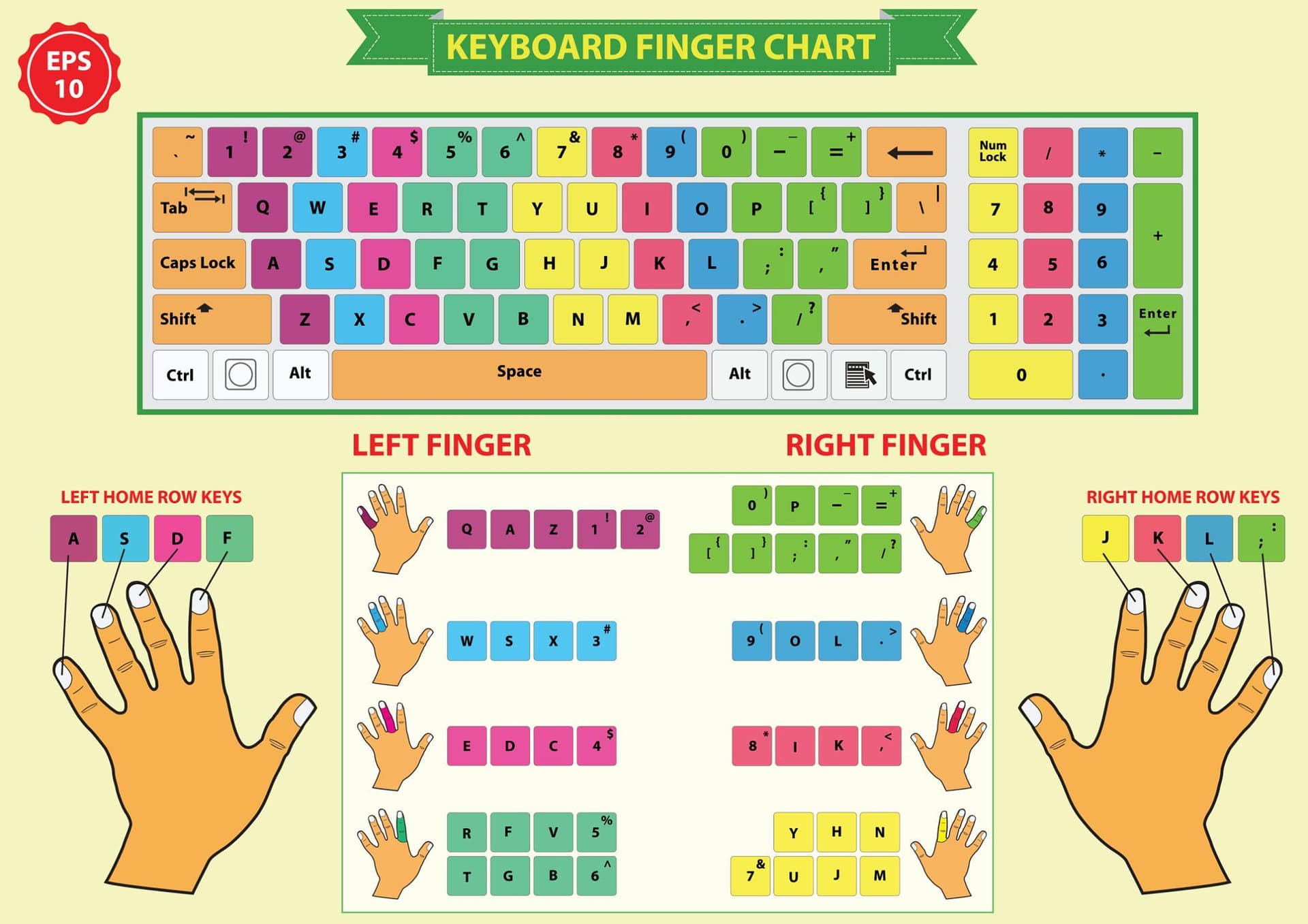
Left Hand Responsibilities
- Left Pinky Finger: Q, A, Z, Left Shift, Tab, Caps Lock
- Left Ring Finger: W, S, X
- Left Middle Finger: E, D, C
- Left Index Finger: R, T, F, G, V, B
Right Hand Responsibilities
- Right Index Finger: Y, U, H, J, N, M
- Right Middle Finger: I, K, , (comma)
- Right Ring Finger: O, L, . (period)
- Right Pinky Finger: P, ;, /, Right Shift, Enter, Backspace
Thumbs
Both thumbs are used for the spacebar. Most people prefer using the dominant thumb, but using either is acceptable as long as it feels natural.
How to Use the Chart Correctly
Reading the chart once is not enough. You need to apply it consistently. Follow these steps:
- Place your fingers on the home row.
- When pressing a key, use only the assigned finger.
- Immediately return that finger to its home position.
- Keep your wrists slightly elevated.
- Avoid looking at the keyboard.
In the beginning, it may feel slower. That’s normal. Your brain is learning new movement patterns.
Common Finger Placement Mistakes
Even small habits can slow down your progress.
- Using One Hand for Everything: Some beginners rely too heavily on one hand. Balanced usage is essential.
- Letting Fingers Hover Randomly: Always return to the home row. Floating fingers create inconsistency.
- Ignoring the Pinky Finger: The pinky handles many keys, including Shift and punctuation. Train it early.
- Pressing Keys Too Hard: Typing should feel light and controlled, not forceful.
Correcting these mistakes early prevents long-term bad habits.
How Long Does It Take to Adjust?
Most beginners need 1–2 weeks of daily practice to feel comfortable with proper finger placement.
If you practice for 15 minutes daily:
- Week 1: Focus on accuracy
- Week 2: Build rhythm
- Week 3: Notice speed improvement
Do not rush the process. Accuracy should always come before speed.
Simple Finger Placement Practice Drill
Start with controlled repetition exercises like:
sad lad fad;
qwer uiop;
zxcv nm,.
Type slowly and correctly. Speed will increase naturally as muscle memory develops.
Why Proper Finger Placement Improves Typing Speed
Typing speed is not about moving faster — it’s about moving efficiently. When every finger handles specific keys:
- Hand travel distance reduces
- Movement becomes predictable
- Errors decrease
- Rhythm improves
This is why professional typists can reach 70–100+ WPM without strain. It’s not talent. It’s technique.
Final Thoughts
The finger placement chart may look structured and strict at first, but it exists for a reason. It has been refined over decades to maximize efficiency on the QWERTY keyboard.
If you want long-term improvement in typing speed and accuracy, commit to using the correct fingers from the beginning. Even if it feels slow today, it will pay off in the future.
Master the fundamentals. Practice consistently. Let muscle memory do the work.
Ready to practice?